Catch freeze frames before QC does.
FreezeFramesFinder checks your finished exports for duplicate frames – the small stutters caused by frame rate conversion, speed changes or the edit. You get every spot with timecode, the probable cause and the fix for Premiere Pro and After Effects.
For Mac · no sign-up · no payment details · your videos stay on your computer
Fix in Premiere Pro …
- Runs locally – no uploads
- No subscription
- 14 days, all features
- 30-day money back
- No admin rights needed
One frame too many – and the delivery bounces.
A duplicate frame lasts 40 milliseconds. Watching in real time you barely notice it – in a pan, a camera move or an animation all the more. At the latest in technical QC or the streaming service's check. Then it's: find the spot, export again, deliver again.
You know the causes. Just not every spot.
Duplicate frames are rarely intended. Usually it's a setting nobody has in mind any more:
23.976 in a 25p timeline
Footage with a different frame rate sits in the sequence. Premiere fills the missing frames with repeats (Frame Sampling) – about every 24th frame appears twice.
Slightly slowed-down clips
95 % here, 98 % there, to fill a gap: even small speed changes create regular duplicate frames across the whole clip.
At the cut
A frame hold, a clip that is too short under a transition, or one frame too many at the end of a shot.
Supplied footage
Archive footage, converted or up-converted clips often bring their duplicate frames with them – invisible until something moves in the picture.
Drop in. Check. Fix.
Drop in your exports
Drag single files or whole folders into the window. The check starts right away, you can keep working.
Results at a glance
Red: freeze frames found. Green: OK. One click shows every spot with timecode, preview and curve.
Fix it precisely
Read the probable cause and follow the steps for Premiere Pro or After Effects. Export again, check again – done.
Three exports. Two with stutters.
Red: freeze frames found. Green: OK. Below, every spot with timecode and preview image, the probable cause and the curve across the whole file.
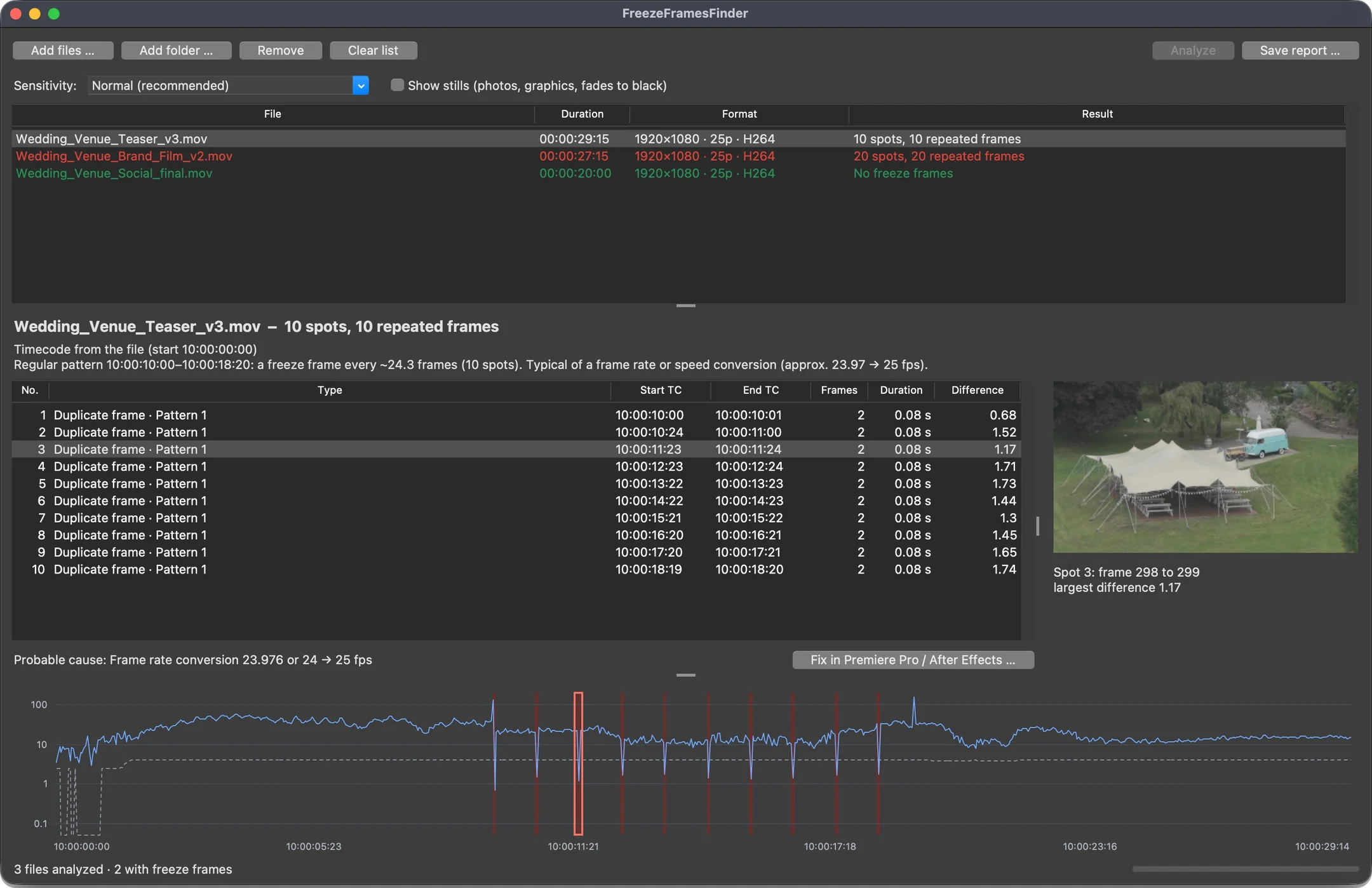
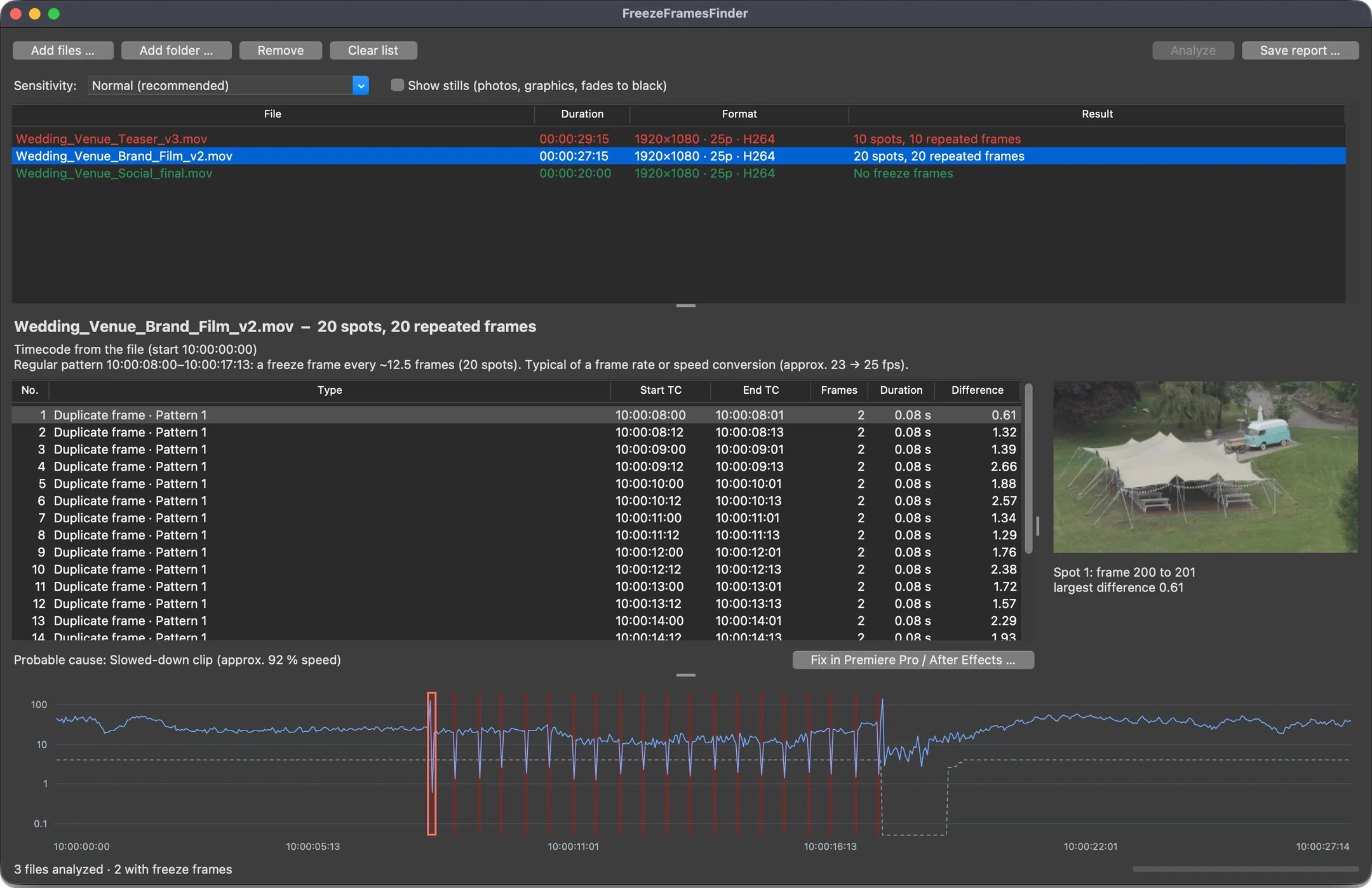
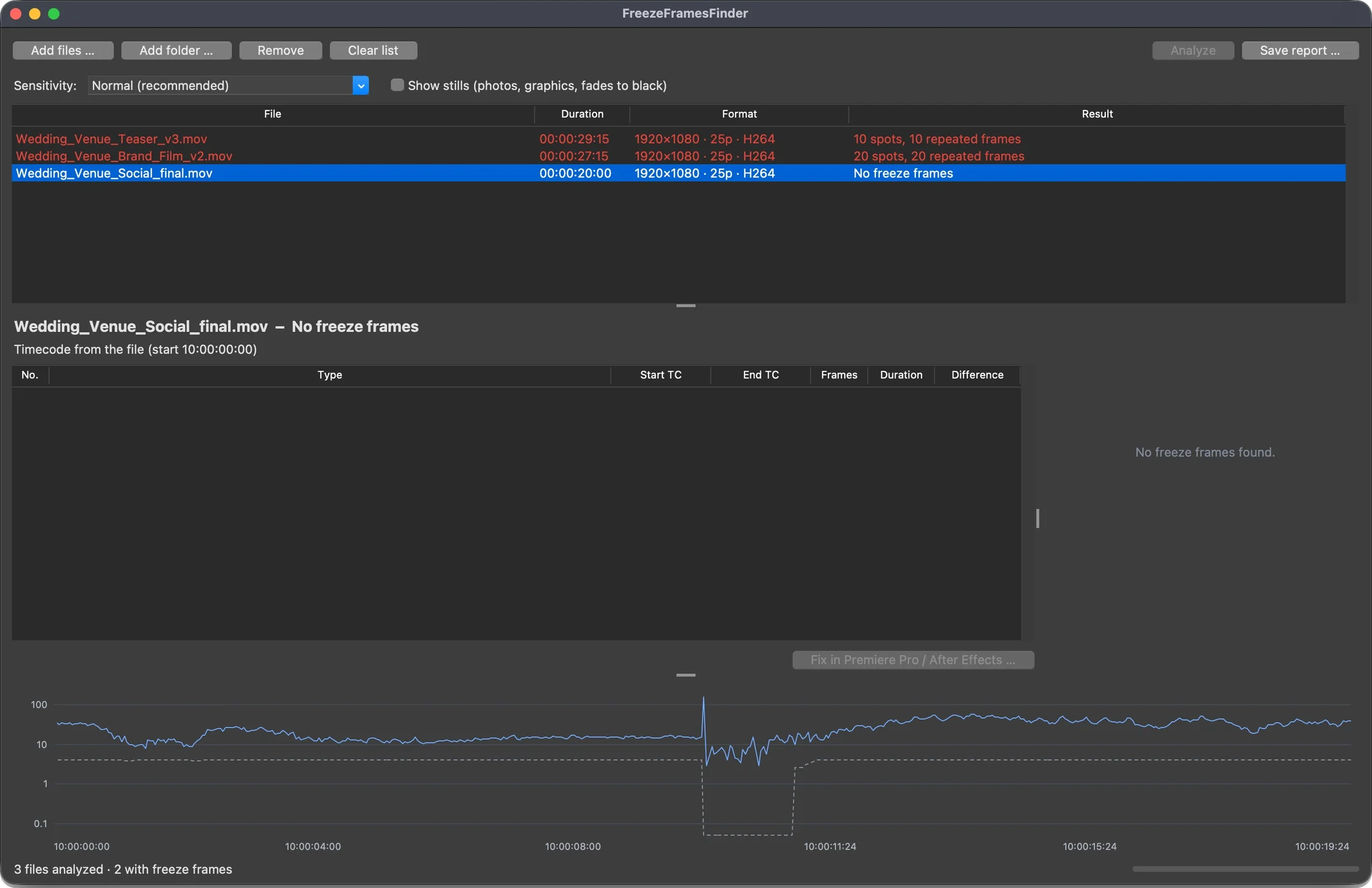
Demo exports from our own drone footage, errors added on purpose. Click an image to see it full size.
Built for the moment before delivery.
Timecode from the file
Every spot with the timecode of your export – including a start timecode like 10:00:00:00 and drop-frame – plus frame number and preview image. You jump straight to the right spot in the sequence.
Patterns, not single hits
If a freeze frame repeats regularly, FreezeFramesFinder groups the spots into a pattern – with range, interval and the probable frame rate of the source footage.
Intended stays intended
Photos, static graphics, Ken Burns moves and fades to black are listed separately as stills. They don't count as errors and only appear if you want them to.
The probable cause
Frame rate conversion, slowed-down clip, repeat at the cut or frame hold – you know where to look in the timeline.
Step-by-step fixes
Concrete instructions for Premiere Pro and After Effects, with menu paths. And if the project is no longer at hand: an After Effects expression that smooths every spot of the finished file in one go.
Reports for QC
HTML report with preview images to send to the editor or client, CSV for Excel, JSON for your own workflows.
Whole seasons at once
Check folders including subfolders, three sensitivity levels, command line for automated workflows.
Local and confidential
Your videos never leave your computer. No cloud, no uploads, no installation, no admin rights. FreezeFramesFinder only reads – it never changes a file.
Not just where. Also why – and how to fix it.
QC reports tell you that something is wrong. FreezeFramesFinder also tells you where it probably comes from and what to do in your editing software.
The check works with exports from any editing software – Avid, Resolve, Final Cut, Premiere. The step-by-step instructions are for Premiere Pro and After Effects. Available in English and German.
Probably: frame rate conversion 23.976 → 25 fps
A clip at 23.976 fps is in a 25p sequence. Here about every 24 frames, in the range 10:00:01:23–10:00:05:21.
Fix in Premiere Pro:
- Go to the spot and check the frame rate: Media Frame Rate column against the sequence timebase.
- Small speed change OK? Clip in the Project panel: Modify → Interpret Footage → Assume this frame rate: 25.
- Length must stay the same? Clip → Video Options → Time Interpolation → Optical Flow.
- Export again and check the export once more.
Why not just watch it?
Because a single duplicate frame is almost invisible during playback – and big QC systems are built for broadcasters, not for the edit suite.
| Watching it yourself | Big QC systems | FreezeFramesFinder | |
|---|---|---|---|
| Finds single duplicate frames | only with luck | yes | yes |
| Separates intended stills | yes | depends on settings | yes |
| Names cause and fix for Premiere Pro and After Effects | – | no | yes |
| Setup | – | servers, profiles, training | drop in a file |
| Cost | your time | enterprise pricing on request | from €149 one-time |
For everyone who delivers.
Editors
A final check before uploading for QC – without going through the piece frame by frame again.
Post-production houses
Consistent checks for the whole team, with reports you can send to the client.
Broadcasters and QC
Check delivered pieces quickly and report errors back with timecode and cause.
Agencies and corporate
Deliver brand films, social clips and commercials cleanly – even when footage comes from many sources.

Made in the edit suite, not in a lab.
FreezeFramesFinder comes from television post-production – developed by Thomas Kipp Alcantara, an editor and media designer, for the daily check before delivery. It was tested on real, approved broadcast pieces and on dozens of test clips from all common encoders: it reports what is visible as a stutter – not every calm picture.
Buy once. No subscription.
All updates of version 1 included. Prices excl. VAT – VAT is added at checkout depending on your country; as a business you enter your VAT ID there.
Single seat
- 1 person
- up to 2 computers
- all updates of version 1
- license key right after purchase
Team
- up to 5 people
- up to 10 computers
- all updates of version 1
- manage computers yourself
Company license
- any number of workstations at one site
- invoice, payment by bank transfer
- offline keys – also for computers without internet
This offer is aimed exclusively at businesses and self-employed professionals (entrepreneurs within the meaning of Section 14 of the German Civil Code). The seller in the online shop is our payment partner Polar Software Inc. as reseller; the Polar buyer terms apply, and the license agreement governs use. The checkout calculates VAT depending on your country and on whether you buy as a business with a VAT ID.
14 days, all features. No sign-up.
Download, unzip, start. After the trial, FreezeFramesFinder still shows without a license whether and how many freeze frames an export has.
Version 1.4.1 · macOS 14 or later with Apple silicon · English and German
Windows version in preparation – get notified
Frequently asked questions
What exactly counts as a freeze frame – and what doesn't?
A freeze frame is a visible stutter: one or two frames repeat their predecessor while the shot around them is moving. Intentionally static pictures – photos, graphics, fades to black, calm shots – are listed separately by FreezeFramesFinder as stills. They don't count as errors.
How reliable is the detection?
FreezeFramesFinder was tested on approved broadcast pieces and on test clips from all common encoders. In very calm shots or at very low bit rates a spot can slip through – there it is usually not visible either. Three sensitivity levels help with borderline cases. It does not replace the visual check before delivery, but it makes it far more targeted.
Doesn't Premiere Pro already show duplicate frames?
Premiere's “Duplicate Frame Markers” show where you use the same clip several times in the timeline. FreezeFramesFinder instead checks the finished file for repeated frames – no matter whether they come from a frame rate conversion, a speed change or the export.
Does it work with Avid, Resolve or Final Cut?
Yes. It checks the finished export, from whatever software. The step-by-step fix instructions are for Premiere Pro and After Effects.
Which files can I check?
MP4, MOV, MXF, MKV, AVI, MTS/M2TS and WebM – with H.264, ProRes, DNxHD/DNxHR, MPEG-2 (e.g. XDCAM), DV, Motion JPEG, JPEG 2000, CineForm and more. All common frame rates, including drop-frame. H.265/HEVC, AV1 and WMV are currently not supported – check finished exports as H.264, ProRes or DNxHR.
Is the program in English?
Yes – English and German. FreezeFramesFinder follows your system language; you can switch at any time under Help → Language. Reports are written in the same language.
What happens after the 14 trial days?
Without a license, FreezeFramesFinder still shows whether and how many freeze frames a file has. Timecodes, preview, cause, fix and reports come with a license – right after activation, without reinstalling.
Are my videos uploaded? Do I need internet?
No. Your videos stay on your computer. Internet is only needed once to activate a key bought in the shop. For computers without any internet there are offline keys – a short email is enough.
My Mac says the app can't be opened on first start.
Until it is notarized by Apple: close the message, then open System Settings → Privacy & Security and click Open Anyway next to FreezeFramesFinder. This is only needed once, and you don't need admin rights for it.
I have a new computer. What now?
In the program, choose Help → License … “Remove license from this computer” and activate the key on the new computer. If the old computer is gone, release it in your Polar customer account.
Can I return the license?
Best try it free for 14 days first. If the purchased license still doesn't work as described, write to support@freezeframesfinder.de within 30 days of purchase – and we refund the purchase price.
Do I get a VAT invoice?
Yes. Our payment partner Polar handles the purchase, the invoice comes by email. As a business you enter your VAT ID at checkout. For the company license we write our own invoice.
Are updates included?
All updates of version 1 are included. A later version 2 will be available to customers at a discount.
Check your next export before it goes out.
Free for 14 days, no sign-up. Then from €149 one-time.